Utilities
Solve for target values with Goal Seek and speed up routine sheet work with configurable formatting utilities and keyboard shortcuts.
Solve for target values with Goal Seek: specify a target cell, a desired result, and the input to adjust. Plus, trigger your most‑used formatting actions with a single keystroke and create multiple instances with custom settings.
Utilities support familiar Excel‑style shortcuts where applicable. Perfect for analysts who use consistent formatting to indicate formulas, hardcodes, or links, all while staying inside Google Sheets.
Utilities
Goal Seek
Solve formulas by automatically finding the input value that produces a desired result. Specify a target cell, a desired result, and the input cell to adjust. Advanced settings allow you to define calculation precision and optional lower and upper bounds for the variable. Designed for numerical stability and reliable convergence in complex models.
- Alt + A + W + G
Adjust columns & rows
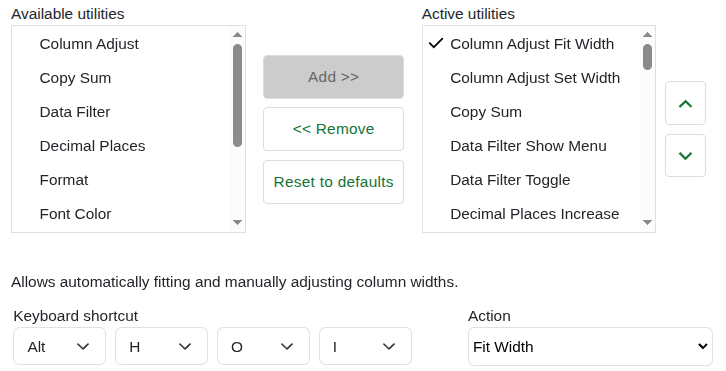
Column Adjust
Auto‑fits column widths, or sets a specific width for selected columns.
- Alt + H + O + Iauto‑fit
- Alt + H + O + Wset width
Row Adjust
Auto‑fits row heights, or sets a specific height for selected rows.
- Alt + H + O + Aauto‑fit
- Alt + H + O + Hset height
Align
Aligns the selected cells horizontally (Centre, Left, Right) or vertically (Top, Middle, Bottom). Show all shortcuts
- Alt + H + A + Ccentre
- Alt + H + A + Lleft
- Alt + H + A + Rright
- Alt + H + A + Ttop
- Alt + H + A + Mmiddle
- Alt + H + A + Bbottom
Border
Applies or removes borders on the selected cells. Supports a comprehensive set of border styles including thick and double variants, plus panels for choosing border colour and style. Show all 18 shortcuts
- Alt + H + B + Nremove
- Alt + H + B + Obottom
- Alt + H + B + Ptop
- Alt + H + B + Dtop & bottom
- Alt + H + B + Lleft
- Alt + H + B + Rright
- Alt + H + B + Soutside
- Alt + H + B + Aall
- Alt + H + B + Kset colour
- Alt + H + B + Yset border
- Alt + H + B + Iinner
- Alt + H + B + Zhorizontal
- Alt + H + B + Vvertical
- Alt + H + B + Tthick outside
- Alt + H + B + Hthick bottom
- Alt + H + B + Cthick top & bottom
- Alt + H + B + Bdouble bottom
- Alt + H + B + Udouble top & bottom
Data Filter
Toggles filters and opens the filter menu for the current column.
- Ctrl + Shift + Ltoggle
- Alt + Shift + Dmenu
Increase / Decrease Decimals
Increases or decreases decimal places.
- Alt + H + 0increase
- Alt + H + 9decrease
Apply & cycle formatting
Number Format Cycle
Quickly switches between general number formats.
- Ctrl + Shift + 1
Percent Format Cycle
Toggles percent styles with one shortcut.
- Ctrl + Shift + 2
Date Format Cycle
Cycles through common date formats.
- Ctrl + Shift + 3
USD Currency Format Cycle
Applies and switches between USD currency formats.
- Ctrl + Shift + 4
EUR & GBP Currency Cycle
Toggles between Euro and Pound formats.
- Ctrl + Shift + 5
Logical Value Format Cycle
Formats TRUE/FALSE values in your preferred style.
- Ctrl + Shift + 6
Font Colour Cycle
Cycles between custom font colours.
- Ctrl + `
Fill Colour Cycle
Quickly applies or toggles between fill colour presets.
- Ctrl + Shift + K
Freeze / Unfreeze
Freeze Row & Column, Unfreeze All, Freeze/Unfreeze Row, Freeze/Unfreeze Column. Show all shortcuts
- Alt + W + F + Ffreeze row & column
- Alt + W + F + Uunfreeze all
- Alt + F + Rfreeze row
- Alt + W + F + Runfreeze row
- Alt + F + Cfreeze column
- Alt + W + F + Cunfreeze column
Group
Groups, ungroups, expands, or collapses row and column groups.
- Alt + A + G + Ggroup
- Alt + A + G + Uungroup
- Alt + A + Jexpand
- Alt + A + Hcollapse
Insert columns & rows
Column Insert
Insert a column to the left or right.
- Alt + I + Cleft
- Alt + I + Gright
Row Insert
Insert a row above or below.
- Alt + I + Rabove
- Alt + I + Bbelow
Merge / Unmerge
Merge All, Unmerge, Merge Horizontally, Merge Vertically.
- Alt + H + M + Amerge all
- Alt + H + M + Uunmerge
- Alt + H + M + Hhorizontal
- Alt + H + M + Vvertical
Paste special & clipboard
Paste Special
Opens the Paste Special dialog. Also supports direct shortcuts to specific modes like values only, formats only, formulas only, transposed, column widths only, or everything except borders.
- Alt + E + S
Copy Sum
Copies the sum of the selected range to the clipboard.
- Ctrl + Shift + S
Text Control
Controls text wrapping in the selected cells: clip, overflow, or wrap.
- Alt + H + W + Cclip
- Alt + H + W + Ooverflow
- Alt + H + W + Wwrap
Text To Columns
Splits the text in the selected cells into separate columns using a delimiter.
- Alt + A + E
Toggle Grid Lines
Shows or hides gridlines for the current sheet.
- Alt + G + F + G
Works inside Google Sheets.